> HTML source: [AegisPocket — Private card wallet for iPhone and iPad | Haloa](https://haloa.cc/apps/aegispocket/)
> Page language: en
[Back to all apps](https://haloa.cc/apps/)
AegisPocket
Private card wallet
# Keep your cards close
Keep card details, ID originals and static membership codes together on iPhone and iPad, with vault authentication and encrypted backup options.
[](https://apps.apple.com/app/id6772859734)[Free and Pro](https://haloa.cc/apps/aegispocket/#pricing)
Free for one month
System requirements · iOS 17.0+ · iPadOS 17.0+
For people who need private document details on hand, use static membership codes, and want to manage their own recovery materials.
## From the App Store
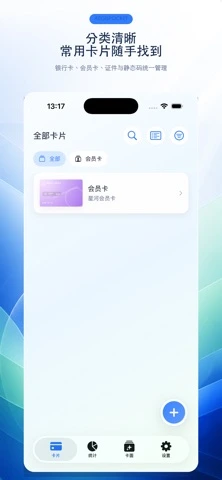

Original Chinese App Store artwork. These published promotional images are not a new recording or a reconstructed app interface.
## What you can do
### Cards with their originals
Organize bank cards, documents, memberships, gift cards and coupons by type. Attach front and back images, then search, filter or sort your collection.
### Start from a photo
Choose an image or take a photo. On-device OCR and barcode recognition provide editable candidates to check before saving. These capture paths do not require Pro.
### Reveal details when needed
Sensitive fields are encrypted and normally masked. Set a vault password, then use Face ID or Touch ID where your device and settings support it.
### Keep static codes handy
Save a fixed QR code or barcode and show it after authentication. Verify the value and format; rotating or dynamic codes are outside this workflow.
### An encrypted snapshot in your iCloud
Optionally upload an encrypted library snapshot to your private CloudKit database and restore it manually. This is backup, not continuous two-way sync.
### Prepare a watermarked copy
Choose a layout and watermark for saved originals, preview the result, then export an A4 PDF. The default watermark includes a purpose and date.
### Encrypted local data files
Pro enables importing and exporting complete encrypted card-data files on your device. Keep the file, password and recovery materials safe.
## Choose a task
### Store a private document
1. Set a vault password and add a card manually or choose an image.
2. Check recognition candidates and attach the originals you need.
3. Find the card with search or categories, then authenticate to reveal sensitive details.
A document has a clear place instead of being another loose photo.
An electronic copy does not replace an official identity document or legal verification.
### Show a static membership code
1. Add a static-code card using a fixed value or an image containing its code.
2. Check the recognized value and barcode format, then save.
3. Find the card and authenticate before displaying the code.
Keep fixed membership codes in one place.
Image quality, format and the merchant terminal affect scanning. Dynamic codes are not supported.
### Prepare recovery materials
1. Set up recovery credentials and confirm which data you want to preserve.
2. Use optional iCloud snapshots, or Pro for complete encrypted local data-file import and export.
3. Before restoring, verify the source, credentials and overwrite notice, then check the restored cards and images.
Prepare the materials needed after a mistake or device change.
Recovery is not guaranteed without a valid backup and the necessary credentials.
## Free and Pro
Pro is available as monthly and yearly subscriptions.
| Feature | Free | Pro |
| --- | --- | --- |
| Cards with their originals | ✓ | ✓ |
| Start from a photo | ✓ | ✓ |
| Reveal details when needed | ✓ | ✓ |
| Keep static codes handy | ✓ | ✓ |
| An encrypted snapshot in your iCloud | ✓ | ✓ |
| Prepare a watermarked copy | ✓ | ✓ |
| Encrypted local data files | — | ✓ |
### Free
- Card management, search, categories, masking and authentication.
- Current photo/OCR, static-code, optional iCloud snapshot and basic watermarked-PDF paths do not require Pro.
### Pro
Free for one month
- Import and export of complete encrypted local card-data files.
- Pro does not mean multiple vaults, dynamic codes or real-time device sync are already available.
[](https://apps.apple.com/app/id6772859734)
Prices and available offers come from the App Store. Review eligibility, billing periods and renewal terms before confirming a purchase. Manage subscriptions with Apple.
[Manage subscriptions with Apple](https://support.apple.com/118428)
## Your data and the limits
Data is local by default; sensitive fields use encryption and system key-management facilities.
OCR and barcode candidates are processed on the device. Optional iCloud backup uploads encrypted snapshots to your private Apple database.
Copying sensitive details uses the system clipboard. Automatic clearing cannot guarantee another app never read the copied value.
[Privacy policy](https://haloa.cc/apps/aegispocket/privacy/)
### Before you start
- No Apple Pay, NFC access-card emulation or rotating payment codes.
- Check OCR results. Biometric authentication depends on compatible hardware and security settings.
- Restoring requires the right backup and credentials; local-first does not make cloud backup offline.
## Version and compatibility
**Listed version**
AegisPocket 1.0
**System requirements**
iOS 17.0+ · iPadOS 17.0+
**View on the App Store**
[](https://apps.apple.com/app/id6772859734)
Version information and notes come from the public App Store listing.
## AegisPocket · Product questions
**What can I use in AegisPocket without Pro?**
Basic card management and protection, current photo/OCR capture, static codes, optional iCloud snapshots and basic watermarked PDFs do not require Pro. Complete encrypted local data-file import and export require Pro.
**Can AegisPocket pay or emulate an access card?**
It stores details and static codes. It is not Apple Pay or an NFC emulator, and does not support rotating dynamic codes.
**Does AegisPocket sync through iCloud in real time?**
No. The confirmed workflow is optional encrypted library snapshots and manual restore, with an Apple account, network and working iCloud access.
**Does AegisPocket send ID images to an AI service?**
The released recognition workflow uses on-device Vision. Optional iCloud backup separately uploads encrypted snapshots; it is not default cloud AI recognition.
**Can AegisPocket always recover a forgotten password?**
No. Restoring needs a valid backup and the corresponding recovery materials. Keep them safe and separate from everyday card use.
**Are groups, pinning and a dedicated presentation mode in AegisPocket 1.0?**
Those enhancements belong to later 1.1 development and are not promised as features of the current public 1.0 release.
**What are the verified App Store reference prices for AegisPocket Pro?**
Checked on the United States App Store, AegisPocket Pro is offered at USD $0.99/month or USD $2.99/year (regional App Store confirmation applies). In the current 1.0 release, card storage, on-device OCR/barcode capture, static membership codes, optional iCloud encrypted snapshots, and watermarked A4 PDF export do not require Pro; Pro unlocks complete encrypted local data-file import and export.
**How do I export a watermarked ID copy PDF to prevent document misuse?**
After attaching the front and back originals to a document card, open the watermarked PDF export tool, choose an A4 scan layout, customize the watermark text (which includes the intended purpose and date by default, such as 'For lease verification only'), preview the page, and export the watermarked A4 PDF.
## AegisPocket
Keep card details, ID originals and static membership codes together on iPhone and iPad, with vault authentication and encrypted backup options.
[](https://apps.apple.com/app/id6772859734)[Support](https://haloa.cc/apps/aegispocket/support/)[Privacy policy](https://haloa.cc/apps/aegispocket/privacy/)
Free for one month
## More from Haloa
[### PasteNook Clipboard history A clipboard history tool for text, links, images, and files. Keep the things you copy close, and find them when you need them. MacExplore](https://haloa.cc/apps/pastenook/)
[### AirCalendar Menu bar calendar A menu bar calendar with dates, weather, events, and to-dos. A quiet home for your daily plans, right on your Mac. MacExplore](https://haloa.cc/apps/aircalendar/)
[### Clipture Screenshots & OCR Screenshots, annotations, and text recognition in a focused Mac tool. Capture what matters and get it ready to share. MacExplore](https://haloa.cc/apps/clipture/)
[Documentation index](https://haloa.cc/llms.txt)