> HTML source: [LociMark — Local Mac bookmark manager, import and organization | Haloa](https://haloa.cc/apps/locimark/)
> Page language: en
[Back to all apps](https://haloa.cc/apps/)
LociMark
Bookmark library
# Find the link you saved
Bring exported links from browsers and bookmarking tools into a local Mac library, then search, organize and review them over time.
[](https://apps.apple.com/app/id6808972699?mt=12)[Free and Pro](https://haloa.cc/apps/locimark/#pricing)
Free for one month
System requirements · macOS 26.2+
For researchers, developers, students and collectors who use several browsers or want to migrate their saved links.
## From the App Store
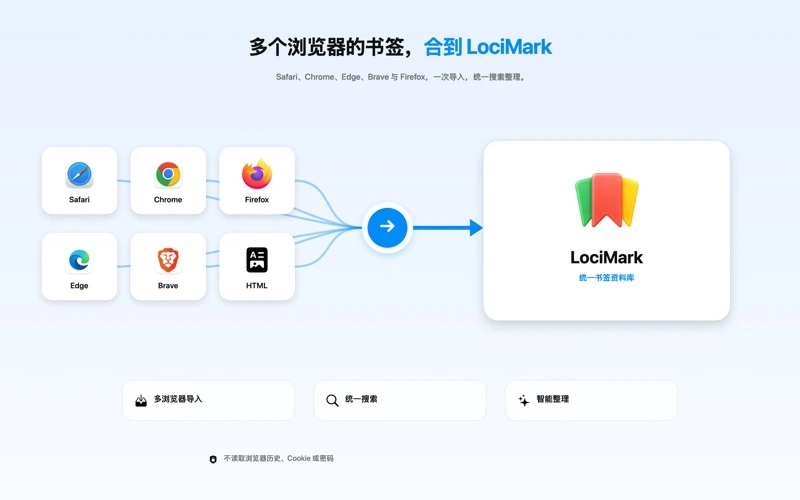
Original Chinese App Store artwork. These published promotional images are not a new recording or a reconstructed app interface.
## What you can do
### Bring scattered links together
Preview and import browser HTML, supported Anybox/GoodLinks/Pinboard JSON, and Raindrop/Pocket CSV files. Free holds up to 500 active bookmarks.
### Find what you remember
Search saved titles, URLs, notes, summaries, tags and folders. This does not mean every remote page has been downloaded for full-text search.
### Give links a place
Organize individual items with folders, tags, stars, read-later and unorganized states, keeping short-term collecting separate from lasting references.
### Keep your own copies
Make manual or automatic local backups, preview them before a preserving merge restore, and export standard HTML or Markdown.
### Work through a batch
Pro adds bulk tags, moves and read-later actions, plus one-click organization and duplicate cleanup. Local rules propose changes; you choose whether to apply them.
### Save and filter with fewer steps
Pro adds browser-profile migration, the floating saver and advanced combined filters. Reading a current browser tab requires automation permission.
## Choose a task
### Combine browser collections
1. Export standard bookmark HTML from your browsers.
2. Choose the matching format in LociMark and review the preview and net additions.
3. Confirm the import, then find links by source, folder or keyword.
Several sources become one local library.
This is not continuous two-way sync and does not automatically change your browser bookmarks.
### Review duplicates and unorganized links
1. Open the duplicate or unorganized collection and inspect candidates and reasons.
2. Add notes or tags individually; use Pro for bulk and one-click processing.
3. Check the changes and available undo, restoring mistaken removals from Trash when needed.
Maintain the collection instead of simply growing another list.
A temporarily unavailable link is not proof a page is permanently gone.
### Migrate and keep a portable copy
1. Get a supported JSON, CSV or HTML export from the source tool.
2. Select its format and check imported tags, summaries and notes.
3. Create a local backup and export HTML or Markdown.
Keep a copy you can use in another workflow.
Missing source fields are not invented. Free imports and restores still respect the 500-item capacity.
## Free and Pro
Monthly, yearly and lifetime plans unlock the same current Pro features. Some store products share a name: check the selected plan and billing period in the app.
| Feature | Free | Pro |
| --- | --- | --- |
| Bring scattered links together | ✓ | ✓ |
| Find what you remember | ✓ | ✓ |
| Give links a place | ✓ | ✓ |
| Keep your own copies | ✓ | ✓ |
| Work through a batch | — | ✓ |
| Save and filter with fewer steps | — | ✓ |
### Free
- Up to 500 active bookmarks, basic saving/import/search and individual organization.
- Local backup, preserving restore and HTML/Markdown export.
### Pro
Free for one month
- Remove the free capacity limit and use bulk and one-click organization/duplicate actions.
- Browser-profile migration, floating saving and advanced combined filters.
[](https://apps.apple.com/app/id6808972699?mt=12)
Prices and available offers come from the App Store. Review eligibility, billing periods and renewal terms before confirming a purchase. Manage subscriptions with Apple.
[Manage subscriptions with Apple](https://support.apple.com/118428)
## Your data and the limits
No developer account is required; the library is local by default.
Quick Save reads the current title and URL only when requested and permitted. It does not continuously read history, cookies or passwords.
Page previews, link checks and favicons contact the relevant sites. Purchases and version information use Apple services.
[Privacy policy](https://haloa.cc/apps/locimark/privacy/)
### Before you start
- The current public store requires macOS 26.2 or later.
- No promised live browser sync, released mobile app, full offline reader or permanent web archive.
- Link checks can be affected by login, anti-bot controls and networking. Backups and exports are not encrypted by default.
## Version and compatibility
**Listed version**
LociMark 1.0
**System requirements**
macOS 26.2+
**View on the App Store**
[](https://apps.apple.com/app/id6808972699?mt=12)
Version information and notes come from the public App Store listing.
## LociMark · Product questions
**How many bookmarks can I keep in LociMark Free?**
Up to 500 active bookmarks. Import and restore calculate net additions against the current library, so duplicate rows are not necessarily new records.
**What does LociMark Pro add?**
More capacity, bulk organization, one-click rules/duplicate cleanup, profile migration, floating saving and advanced filters. Monthly, yearly and lifetime use the same current Pro access.
**Does LociMark sync back to Safari or Chrome live?**
No such promise is made. The current workflow is local import, saving and organization; export HTML if you want to import a copy into a browser.
**Does LociMark send bookmarks to cloud AI for organization?**
The confirmed organization workflow uses local rules. External AI and cloud sync are later directions, not current included services.
**Why does LociMark require macOS 26.2?**
That is the current public store requirement. Compatibility work in development does not change the store version; check the actual listing.
**Does LociMark include released browser extensions or offline web archives?**
Repository extension/Native Messaging experiments, a complete offline reader and permanent page mirrors are not promised released services.
**What are the verified App Store reference prices for LociMark Pro?**
Checked on the United States Mac App Store, LociMark Pro offers a one-time Lifetime unlock at USD $2.99, an Annual subscription at USD $2.99/year, and a Monthly subscription at USD $1.99/month (while up to 500 active bookmarks, multi-format import, local backups, and HTML/Markdown export are free). Regional prices and offers are confirmed by the App Store at checkout.
**How do I consolidate Safari, Chrome, Raindrop, or Anybox bookmarks locally without a cloud account?**
Export standard HTML bookmark files from your browsers—or supported JSON from Anybox/GoodLinks/Pinboard and CSV from Raindrop/Pocket—preview the net additions in LociMark before importing each file, and then open the Duplicates view to review normalized URL candidates locally on your Mac.
## LociMark
Bring exported links from browsers and bookmarking tools into a local Mac library, then search, organize and review them over time.
[](https://apps.apple.com/app/id6808972699?mt=12)[Support](https://haloa.cc/apps/locimark/support/)[Privacy policy](https://haloa.cc/apps/locimark/privacy/)
Free for one month
## More from Haloa
[### PasteNook Clipboard history A clipboard history tool for text, links, images, and files. Keep the things you copy close, and find them when you need them. MacExplore](https://haloa.cc/apps/pastenook/)
[### AirCalendar Menu bar calendar A menu bar calendar with dates, weather, events, and to-dos. A quiet home for your daily plans, right on your Mac. MacExplore](https://haloa.cc/apps/aircalendar/)
[### Clipture Screenshots & OCR Screenshots, annotations, and text recognition in a focused Mac tool. Capture what matters and get it ready to share. MacExplore](https://haloa.cc/apps/clipture/)
[Documentation index](https://haloa.cc/llms.txt)