> HTML source: [PhysicsLab — Interactive Middle-School Physics Lab for iPad | Haloa](https://haloa.cc/apps/physics-lab/)
> Page language: en
PhysicsLab
iPad Interactive Physics Lab & Learning
# Build circuits, see the laws
Wire circuits, move lenses, and balance levers directly on an iPad canvas with guided steps and live meter readings to master middle-school physics laws.
[](https://apps.apple.com/app/id6814108309)
- 8 Physics Domains and 50 Structured Lab Courses
- DC Circuit Canvas with Physical and Schematic Views
- Optical Bench and Reflection, Refraction & Plane Mirror Inquiry
- Simple Machines, Measurement & Motion, and Force Workbenches
- Acoustics, Thermal States, and Electromagnetism Simulations
- Guided Inquiry Steps, Circuit Challenges & Local PNG Archive
SHOWCASE
## From the App Store
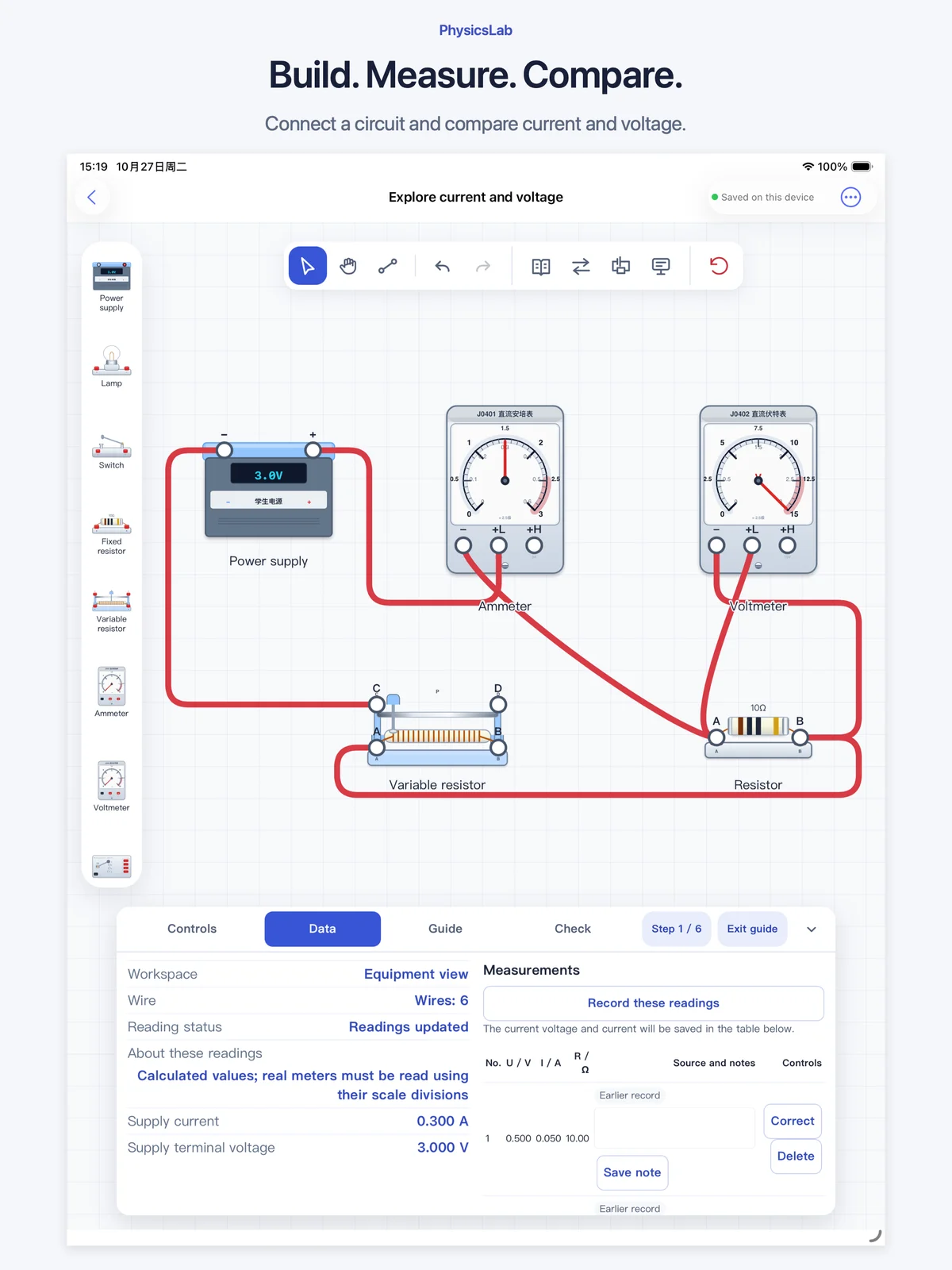
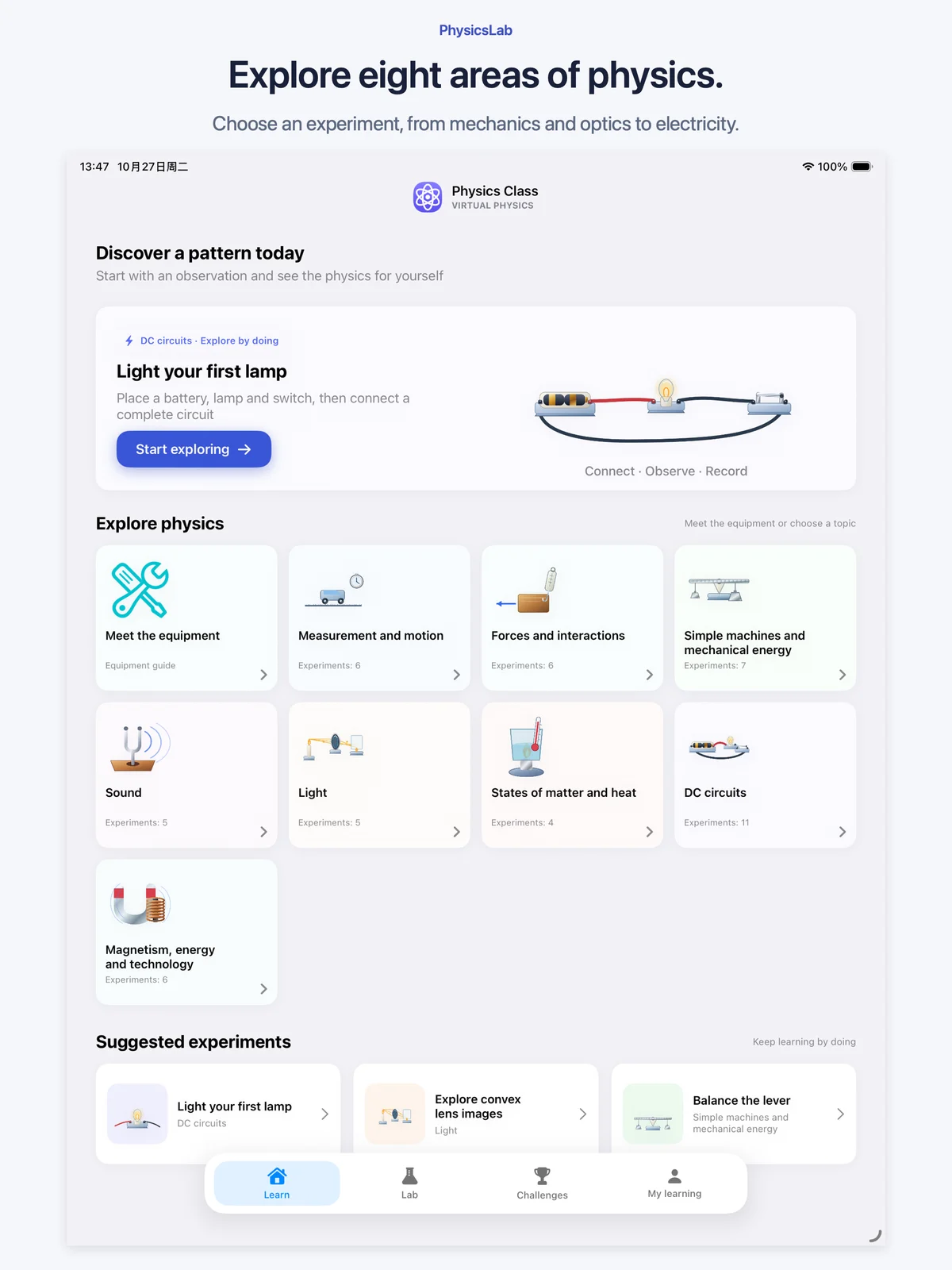
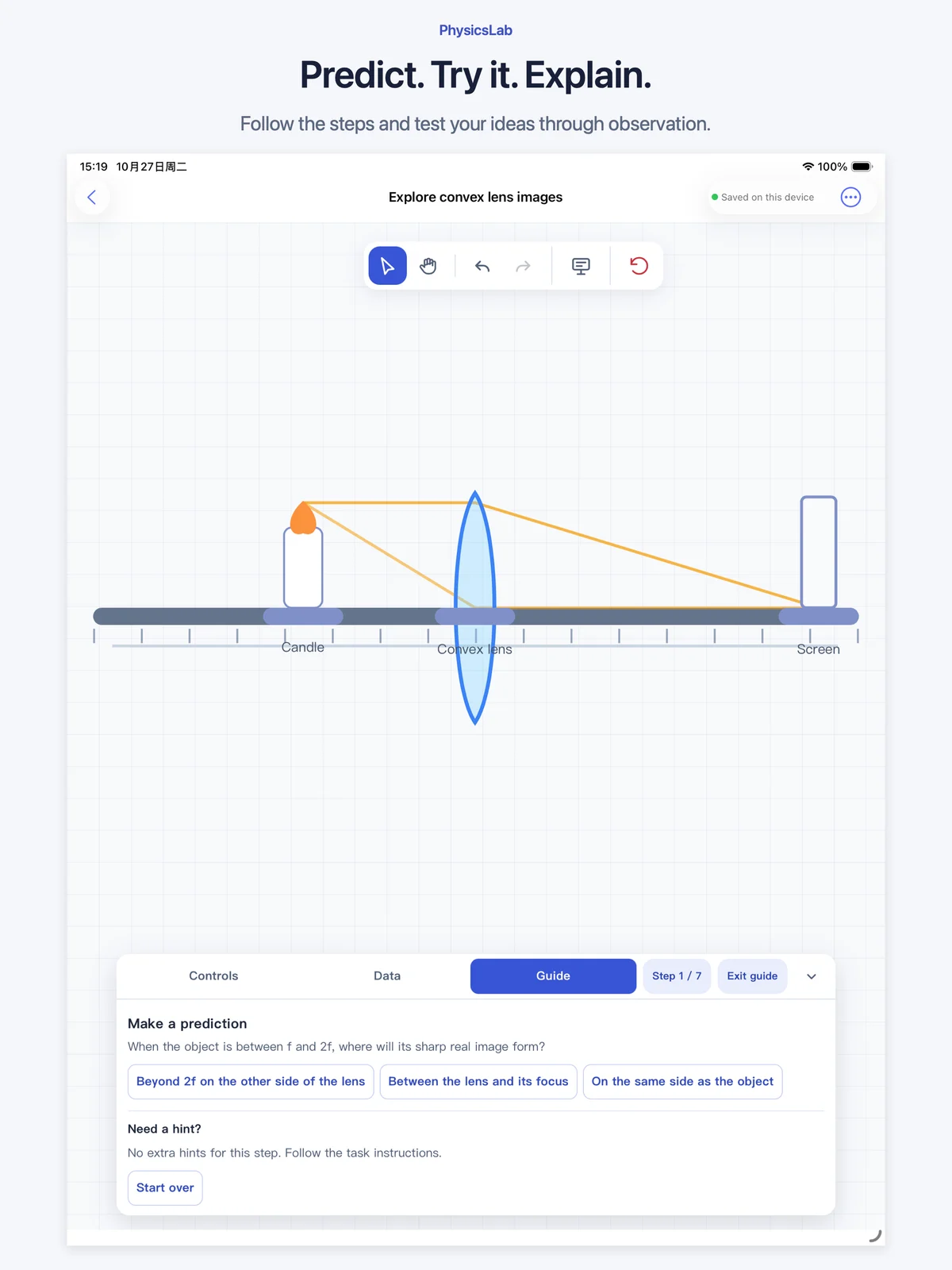
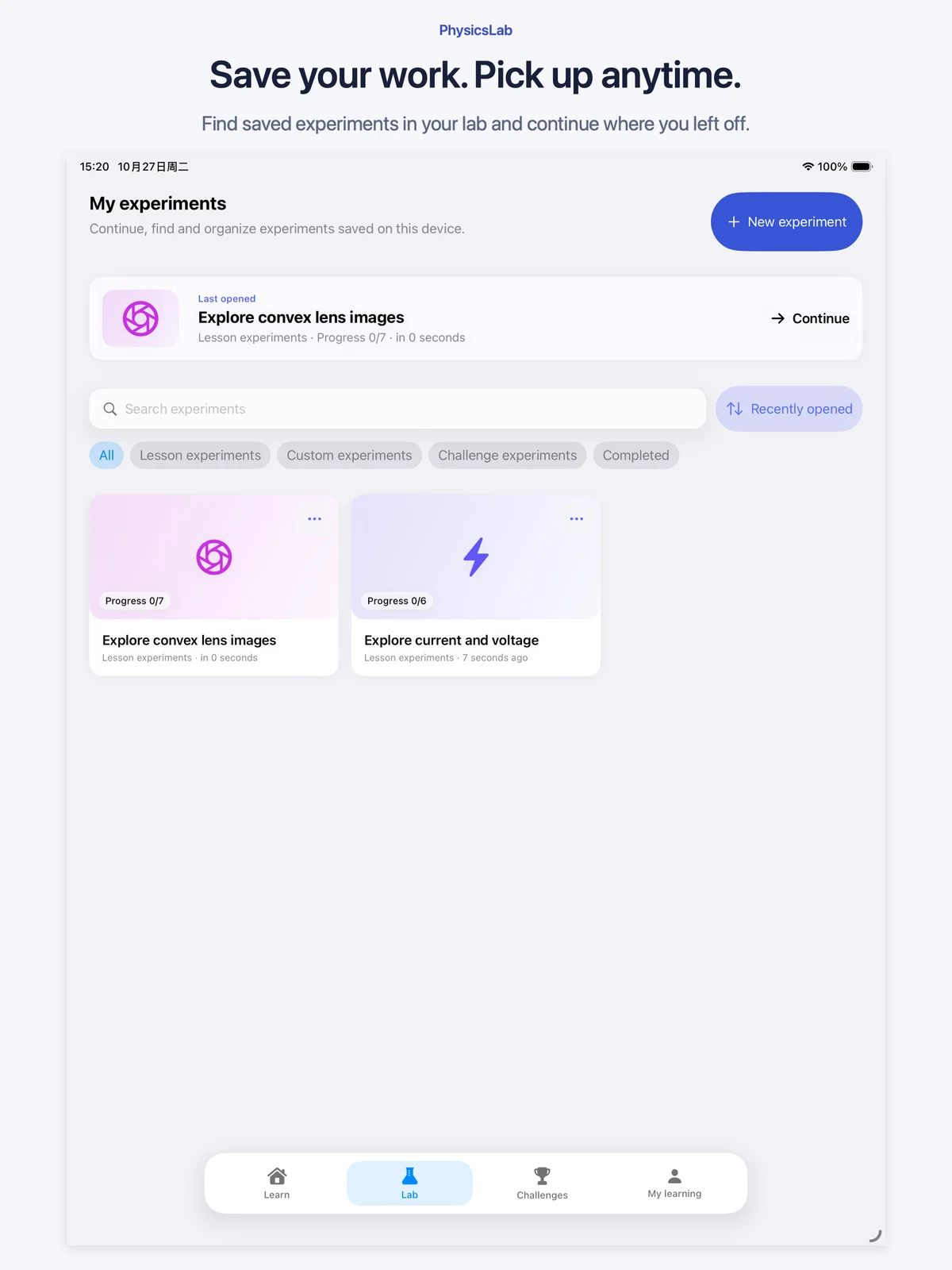
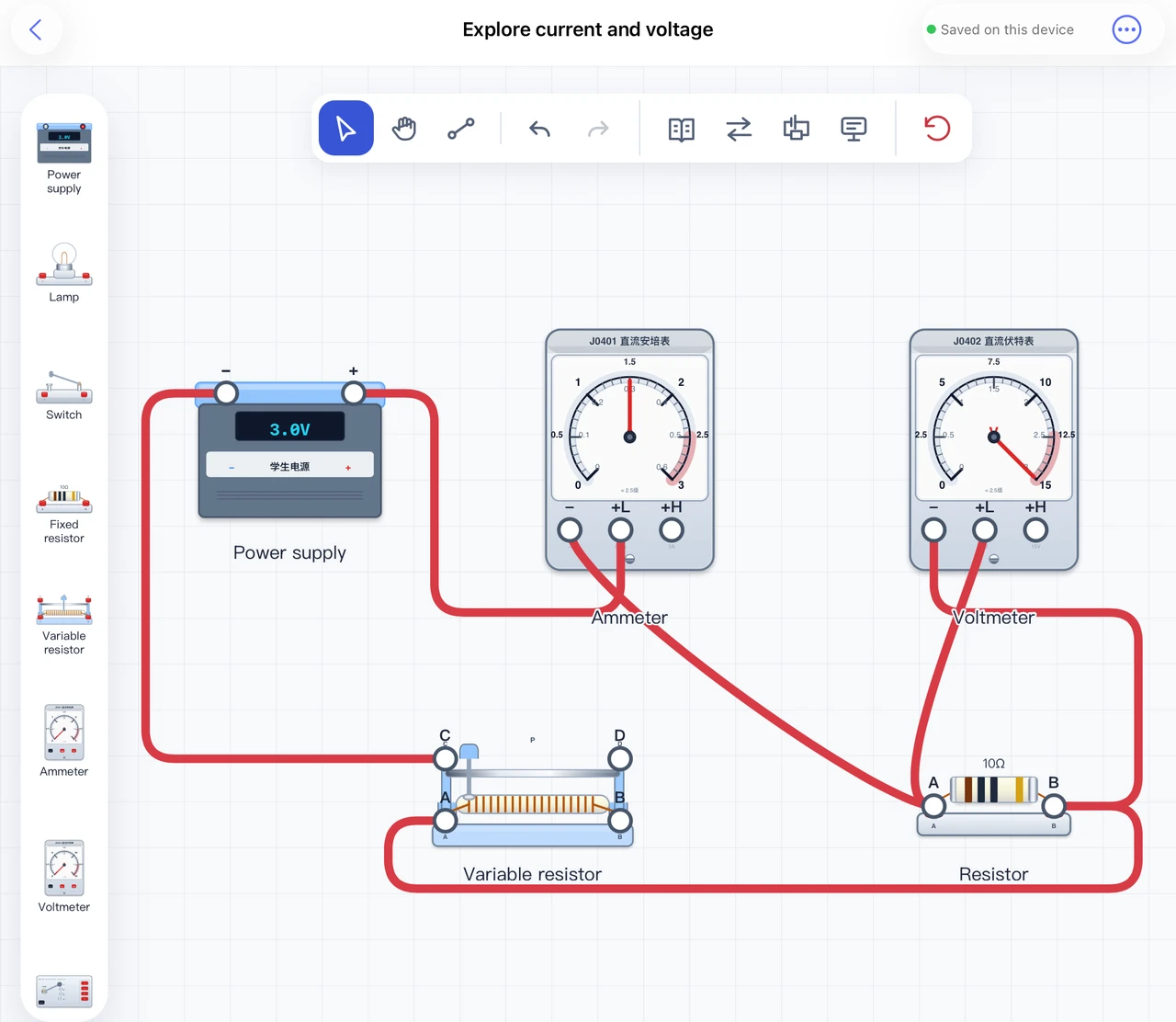
Published iPad App Store screenshots for PhysicsLab (circuit measurement workbench, eight-domain home, guided optics experiment, and local experiment library).
FEATURES
## What you can do
Designed for students and teachers reviewing middle-school physics, demonstrating circuits and optics in class, or practicing circuit troubleshooting.
PhysicsLab
### 8 Physics Domains and 50 Structured Lab Courses
Explore 50 structured lessons across 8 domains (electricity, mechanics, motion, optics, acoustics, thermal, and electromagnetism), with 3 full experiments free.
PhysicsLab
### DC Circuit Canvas with Physical and Schematic Views
Wire power supplies, switches, lamps, meters, and rheostats with live voltage/current solving, fault detection, and instant physical-to-schematic switching.
PhysicsLab
### Optical Bench and Reflection, Refraction & Plane Mirror Inquiry
Drag candles, convex lenses, and screens on the optical bench or adjust incidence angles to observe real-time ray paths and image formation.
PhysicsLab
### Simple Machines, Measurement & Motion, and Force Workbenches
Balance levers, test pulley systems, measure density with scales and cylinders, plot motion graphs, and compare friction, pressure, and buoyancy.
PhysicsLab
### Acoustics, Thermal States, and Electromagnetism Simulations
Visualize sound frequency and amplitude, melting and boiling curves, magnetic field lines, electromagnets, and electromagnetic induction.
PhysicsLab
### Guided Inquiry Steps, Circuit Challenges & Local PNG Archive
Follow structured Guide, Operate, Data, and Check panels plus 2 circuit challenges; save all progress locally and export crisp PNG snapshots.
The cards are drawn on this page with sample data.
WORKFLOWS
## Choose a task
### Complete a free starter physics experiment from start to finish
1. Open the Curriculum tab and select one of the 3 free starter experiments: Light the First Lamp, Balance the Lever, or Convex Lens Free Exploration.
2. Record your initial prediction in the guided panel, then follow the step prompts to wire the circuit, adjust lever weights, or position the candle and screen.
3. Check the live readouts, fill in your observation log and lab notes, and save the snapshot to your local Experiment Archive or export a PNG image.
Experience the full inquiry workflow—apparatus interaction, step verification, data logging, local saving, and PNG export—without creating an account or subscribing.
All 3 free starter experiments have no trial timer or save count limit.
### Cross-check physical wiring against a standard circuit schematic
1. Open a DC Electricity course or freeform circuit workspace and place a power supply, switches, lamps, resistors, rheostat, ammeter, and voltmeter.
2. Wire the terminals and close the switch, using the loop diagnostics and meter readouts to spot open circuits, short circuits, or reversed meter polarity.
3. Toggle between Physical View and Schematic Symbol View on the canvas to verify your circuit topology, then save a duplicate snapshot for comparison.
Build a clear mental map between physical terminal wiring and standard schematic diagrams while practicing fault diagnosis.
Circuit calculations use an ideal educational model tailored for middle-school physics concepts.
### Organize your local Experiment Archive and export PNG snapshots
1. Switch to the Experiment Archive tab and filter saved lab documents by physics domain, course title, or recent activity.
2. Reopen any saved experiment to continue editing, or duplicate a snapshot to test new parameter combinations without overwriting your original record.
3. Tap Export PNG in the workspace to save a clean image of your lab setup to Photos or Files for study notes, lab reports, or classroom slides.
All lab setups and notes stay organized on your iPad, and historical records remain viewable and exportable even if a subscription expires.
Experiment files are stored locally in the app sandbox on your device; deleting the app removes unexported local records.
PRICING
## Free and Pro
Free includes core lab modules and introductory lessons; Pro unlocks all 50 courses, 2 circuit challenges, and freeform experiments.
### Free
Free
- Full access to 3 complete starter experiments: Light the First Lamp (DC Electricity), Balance the Lever (Simple Machines), and Convex Lens Free Exploration (Optics)
- Browse the complete catalog of 8 physics domains, 50 structured lab courses, and 2 challenges with learning goals and estimated durations
- Includes full apparatus interaction, guided steps, observation logging, lab notes, local snapshot saving, duplication, and PNG export within the 3 free labs
- If a membership expires, all previously saved experiment records remain intact on-device for viewing and PNG export
Pro
### Pro
Paid unlock
Free for one month
- Unlock full interactive access to all 50 courses across 8 physics domains (including the remaining 47 courses)
- Unlock both independent circuit challenges—Control Two Lamps Independently and Troubleshoot an Open Circuit—with rule verification and hints
- Unlock separately created freeform experiments to build, save, duplicate, and edit custom setups
- Available as a Monthly auto-renewable subscription (with a 1-month free trial when eligible) or a one-time Lifetime purchase with identical full access
[](https://apps.apple.com/app/id6814108309)
| Feature | Free | Pro |
| --- | --- | --- |
| 8 Physics Domains and 50 Structured Lab Courses | ✓ | ✓ |
| DC Circuit Canvas with Physical and Schematic Views | ✓ | ✓ |
| Optical Bench and Reflection, Refraction & Plane Mirror Inquiry | ✓ | ✓ |
| Simple Machines, Measurement & Motion, and Force Workbenches | ✓ | ✓ |
| Acoustics, Thermal States, and Electromagnetism Simulations | — | ✓ |
| Guided Inquiry Steps, Circuit Challenges & Local PNG Archive | — | ✓ |
Live prices and introductory offer eligibility are shown in the App Store purchase sheet. Billing and Restore Purchases are handled by Apple via StoreKit 2.
[Manage subscriptions with Apple](https://support.apple.com/118428)
PRIVACY & LIMITS
## Your data and the limits
No account required: PhysicsLab has no sign-up, login, or user profile system and does not collect your name, phone number, email, location, or contacts.
On-device simulation and storage: All physics calculations, saved lab snapshots, observation logs, and progress stay locally in your iPad sandbox.
No ads or tracking SDKs: Contains no third-party advertising networks, cross-app tracking, or behavioral analytics SDKs, and never requests camera, microphone, or location access.
Minimal permissions & Apple billing: Photo Library write-only permission is requested only when you save an exported PNG snapshot to Photos; purchases run exclusively through Apple StoreKit 2.
[Privacy policy](https://haloa.cc/apps/physics-lab/privacy/)
### Before you start
- Platform requirement: Requires an iPad running iPadOS 17.0 or later. iPhone, Mac, and web versions are not currently available.
- Simplified educational models: Uses ideal wires and meters in DC circuits, a relative educational loudness scale rather than calibrated dB SPL, virtual electromagnet pin counts, and qualitative heat transfer direction.
- Not a substitute for physical lab safety training: Designed for conceptual understanding and inquiry practice; does not replace hands-on physical apparatus calibration or laboratory safety training.
- Local-only archive & Simplified Chinese course UI: Experiment records are stored on-device without automatic iCloud sync, and the in-app workspace UI and built-in course text are primarily presented in Simplified Chinese.
COMPATIBILITY
## Compatibility
**System requirements**
iPadOS 17.0+
**View on the App Store**
[](https://apps.apple.com/app/id6814108309)
FAQ
## PhysicsLab · Product questions
### Which devices and OS versions does PhysicsLab support?
PhysicsLab is designed specifically for iPad and requires iPadOS 17.0 or later. It is not currently available on iPhone or Mac.
### What is included in the free version, and is there a time limit?
The free version gives you full access to 3 complete experiments: Light the First Lamp (DC Electricity), Balance the Lever (Simple Machines), and Convex Lens Free Exploration (Optics). There is no trial timer or attempt cap on these 3 labs—you can run, log, save, duplicate, and export PNG snapshots freely.
### How many physics courses and challenges are built into PhysicsLab?
Version 1.0 includes 50 structured courses across 8 physics domains plus 2 independent DC circuit challenges, covering DC Electricity (11), Simple Machines & Mechanical Energy (7), Measurement & Motion (6), Force & Interaction (6), Optics (5), Acoustics (5), States of Matter & Thermal (4), and Electromagnetism & Energy (6).
### Is there any feature difference between Monthly and Lifetime membership?
No. Both plans unlock the exact same full membership scope: all 50 courses across 8 domains, both circuit challenges, and freeform experiment creation and saving. Monthly renews automatically each month (with a 1-month free trial when eligible), while Lifetime is a one-time purchase.
### What happens to my saved experiment records if my subscription expires?
Nothing is deleted. All previously saved experiment snapshots remain on your iPad and can still be opened for viewing and exported as PNG images at any time. The 3 free starter experiments also remain editable and savable.
### What does Pro membership unlock, and how is it priced?
A single Pro membership unlocks all 50 courses across 8 domains, both circuit challenges, and freeform experiment creation and saving. Live prices, purchase options, and trial eligibility are confirmed in the App Store at checkout.
### How do I restore my membership on a new or reinstalled iPad?
Sign in with the same Apple ID used for the original purchase, open PhysicsLab, go to Profile or the Membership page, and tap Restore Purchases to sync your active entitlement via Apple StoreKit 2. Because experiment archives are stored locally on-device, export important PNG snapshots before reinstalling.
### How do I manage or cancel a subscription?
All purchases and subscriptions are handled by the Apple App Store. Go to Settings → Apple Account → Subscriptions on your iPad to review or cancel auto-renewal.
## PhysicsLab
Wire circuits, move lenses, and balance levers directly on an iPad canvas with guided steps and live meter readings to master middle-school physics laws.
[](https://apps.apple.com/app/id6814108309)[Support](https://haloa.cc/apps/physics-lab/support/)[Privacy policy](https://haloa.cc/apps/physics-lab/privacy/)
Listed on
[](https://ipip.fyi/apps/physics-class-by-haloa?ref=badge)
PhysicsLab · System requirements: iPadOS 17.0+
MORE APPS
## More from Haloa
[### PasteNook Clipboard history A clipboard history tool for text, links, images, and files. Keep the things you copy close, and find them when you need them. MacExplore](https://haloa.cc/apps/pastenook/)
[### AirCalendar Menu bar calendar A menu bar calendar with dates, weather, events, and to-dos. A quiet home for your daily plans, right on your Mac. MacExplore](https://haloa.cc/apps/aircalendar/)
[### Clipture Screenshots & OCR Screenshots, annotations, and text recognition in a focused Mac tool. Capture what matters and get it ready to share. MacExplore](https://haloa.cc/apps/clipture/)
[Documentation index](https://haloa.cc/llms.txt)