Write on your screen
Use pens, arrows, shapes and text directly on slides, web pages or your desktop.

TeachingInk · Mac
Annotate your Mac screen during lessons, presentations or training. Draw, write and highlight directly over your content.
Mac 14.0
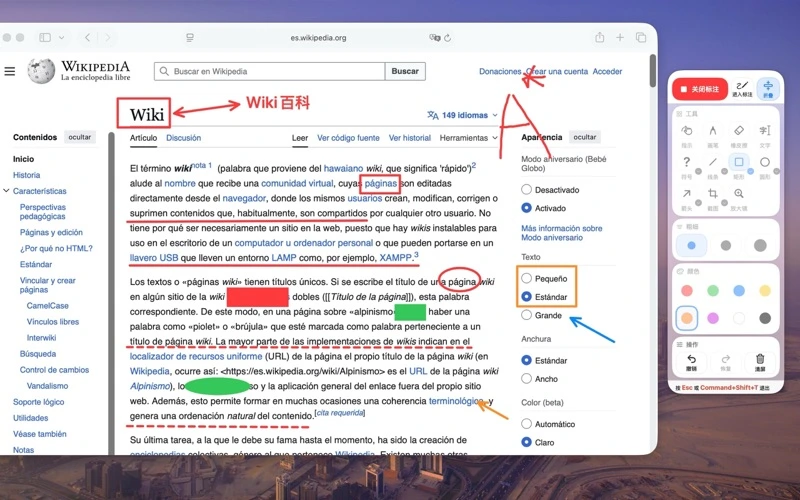
Product images shown in their original language.
TeachingInk
Use pens, arrows, shapes and text directly on slides, web pages or your desktop.
Switch to a whiteboard or blackboard for a fresh explanation.
Use screenshots, local magnification and multi-display coverage during presentations.
Latest on the App Store
Version information and notes come from the public App Store listing.
优化“反馈与支持”窗口,布局更紧凑清晰。 修复部分快捷键无法正常响应的问题。 修复已知问题,提升稳定性和使用体验。
 Mac
MacCopy once. Find it again.
A clipboard history tool for text, links, images, and files. Keep the things you copy close, and find them when you need them.
Explore PasteNook Mac
MacYour day, a click away.
A menu bar calendar with dates, weather, events, and to-dos. A quiet home for your daily plans, right on your Mac.
Explore AirCalendar Mac
MacCapture it. Make it clear.
Screenshots, annotations, and text recognition in a focused Mac tool. Capture what matters and get it ready to share.
Explore Clipture