Show the combination
Display single keys, modifiers and shortcuts in real time. Adjust position, opacity, size, spacing and duration. Graphite and unified styling are free.
EchoKeys
Keys and clicksShow keys and clicks during tutorials, streams and presentations, with optional keyboard and mouse sounds to help viewers follow along.
Free for one month
System requirements · macOS 14.0+
For software educators, trainers, tutorial makers and livestream presenters, working with their preferred recording or meeting tools.
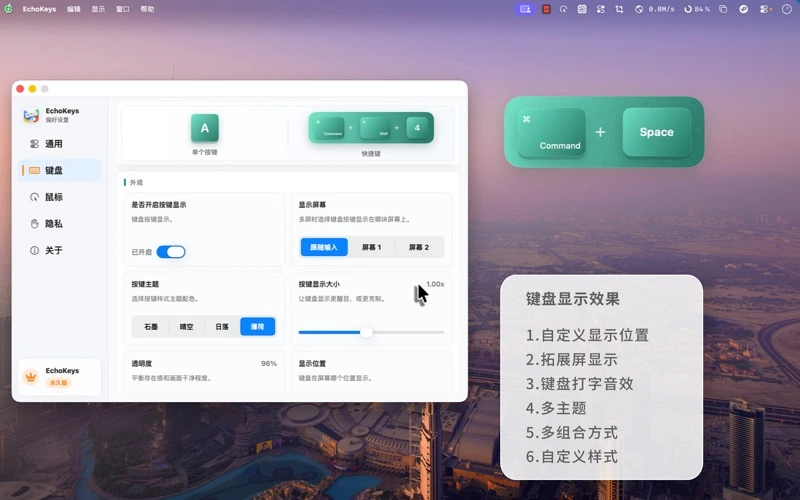
Original Chinese App Store artwork. These published promotional images are not a new recording or a reconstructed app interface.
Display single keys, modifiers and shortcuts in real time. Adjust position, opacity, size, spacing and duration. Graphite and unified styling are free.
Use the free default ripple and adjust its basic size and duration so viewers can locate the click.
Hide keyboard content during system Secure Input, exclude sensitive apps, or pause from the menu bar before a private task.
Pro adds Sky, Sunset and Mint themes, shortcut-emphasis and separate single-key/combination styles.
Pro adds pulse, spotlight and advanced color modes. The existing spotlight effect is separate from future trails or editing features.
Pro provides keyboard and mouse sounds with previews. Getting them into a recording depends on the recorder capturing system audio.
Viewers can see the shortcuts you actually press.
EchoKeys does not record or edit video.
Give viewers a clear cue for interface changes.
Sharing one window may omit the separate overlay. Audio is not automatically mixed into every recorder.
Reduce exposure of key content during a presentation.
Exclusion mainly hides the keyboard overlay, not the original screen. Unmarked custom password fields may not be detected.
Pro offers monthly, yearly and lifetime plans. It enhances real-time display, not video recording, editing or an exportable input timeline.
| Feature | Free | Pro |
|---|---|---|
| Show the combination | ✓ | ✓ |
| Give clicks a visible location | ✓ | ✓ |
| Control what is shown | ✓ | ✓ |
| Distinguish keys and shortcuts | — | ✓ |
| Choose click effects and colors | — | ✓ |
| Add local sound feedback | — | ✓ |
Free for one month

Prices and available offers come from the App Store. Review eligibility, billing periods and renewal terms before confirming a purchase. Manage subscriptions with Apple.
Manage subscriptions with AppleInput events are rendered locally in real time, without building, uploading or exporting a key/mouse-event history.
Input Monitoring observes permitted global events; Secure Input detection relies on system state.
Purchases, restore and version checks use Apple services, so the app is not described as never accessing a network.
Privacy policyVersion information and notes come from the public App Store listing.
Show keys and clicks during tutorials, streams and presentations, with optional keyboard and mouse sounds to help viewers follow along.
Free for one month
Clipboard history
A clipboard history tool for text, links, images, and files. Keep the things you copy close, and find them when you need them.

Menu bar calendar
A menu bar calendar with dates, weather, events, and to-dos. A quiet home for your daily plans, right on your Mac.

Screenshots & OCR
Screenshots, annotations, and text recognition in a focused Mac tool. Capture what matters and get it ready to share.