Haloa Astro

Haloa Astro

Astrology & Reference

Offline Natal Chart & Heart Method Workstation

Calculate high-precision natal charts, read structured 10-chapter Heart Method interpretations, compare relationship synastry, and explore global Astrocartography 100% offline on your Mac.

Download Haloa Astro on the Mac App Store
  • Local Birth Profile Archive & Offline Global City Lookup
  • High-Precision Ephemeris Canvas & Multi-House Systems
  • Natal Heart Method Core (Chapters 1–3) & 7-Day Transits
  • Full 10-Chapter Natal Report, 5 Karmic Points & Unlimited Profiles
  • Transit & Synastry Deep Reports + Optional Cloud AI Q&A
  • 30/90-Day Timelines, Astrocartography (ACG) & High-Res Exports

SHOWCASE

From the App Store

Haloa Astro · From the App Store

Official App Store showcase highlighting key interfaces and daily Mac workflows.

FEATURES

What you can do

Built for astrology practitioners, students, and enthusiasts who want a privacy-first native Mac workstation with local archive storage and print-ready chart/report exports.

Haloa Astro

Local Birth Profile Archive & Offline Global City Lookup

Look up global birthplaces and historical IANA time zones offline via the bundled GeoNames cities500 database. Store profiles with tags and notes under Application Support/AstroMac, and import/export JSON backups. Free includes 1 personal profile plus the built-in sample profile.

Haloa Astro

High-Precision Ephemeris Canvas & Multi-House Systems

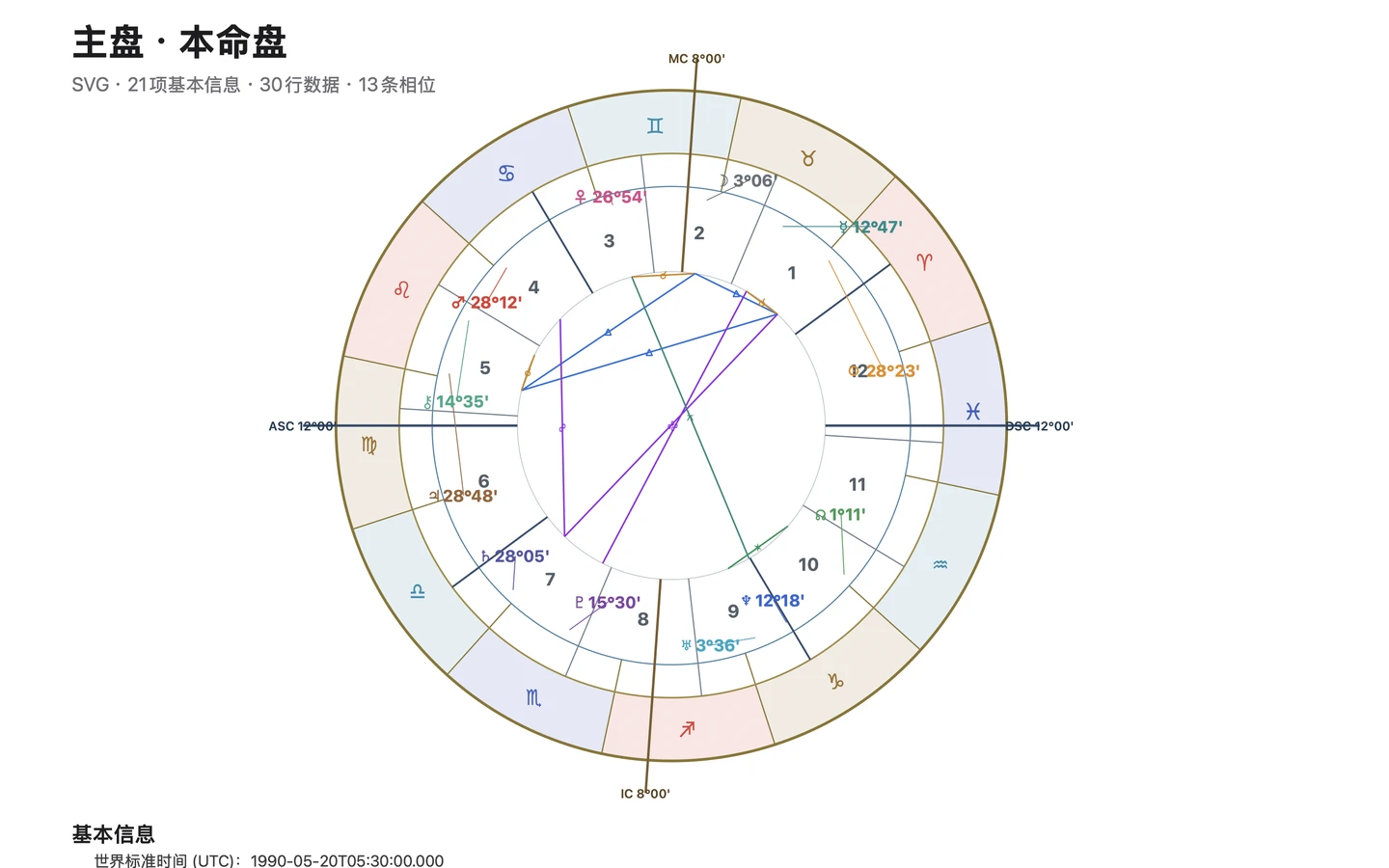
Powered by Astronomy Engine v2.1.19 for 100% offline planetary and lunar node calculations. Switch between Tropical and Sidereal zodiacs, Placidus and Equal house systems, and inspect exact sign degrees, house cusps, and aspect orbs.

Haloa Astro

Natal Heart Method Core (Chapters 1–3) & 7-Day Transits

Read structured offline interpretations for Chapters 1–3 of the Natal Heart Method report (core temperament, Sun-Moon-Ascendant triad, and emotional needs) alongside a 7-day transit overview.

Haloa Astro

Full 10-Chapter Natal Report, 5 Karmic Points & Unlimited Profiles

Pro unlocks unlimited local birth profiles, all 10 chapters of the Natal Heart Method report (covering wealth, career vocation, intimacy, health, and life lessons), and dedicated readings for 5 karmic points (North/South Nodes, Chiron, Lilith, Part of Fortune).

Haloa Astro

Transit & Synastry Deep Reports + Optional Cloud AI Q&A

Pro unlocks full transit forecasts, dual-chart relationship synastry & composite reports, plus optional user-authorized cloud AI interpretation using your own Keychain-protected API key with de-identified chart parameters.

Haloa Astro

30/90-Day Timelines, Astrocartography (ACG) & High-Res Exports

Pro provides 30/90-day transit timelines, global Astrocartography (ACG) planetary lines over an offline Natural Earth basemap, and print-ready exports in PNG, PDF, SVG, Markdown, and TXT.

The cards are drawn on this page with sample data.

WORKFLOWS

Choose a task

Create a birth profile and calculate a natal chart 100% offline
  1. Click New Profile in the sidebar, enter the birth date and time, and search the built-in offline city database to auto-fill coordinates and historical IANA time zones.
  2. Switch zodiac and house systems on the main canvas to inspect planetary degrees, house cusps, and aspect lines.
  3. Open the Natal Heart Method inspector to read Chapters 1–3 and the 7-day transit overview.

Complete chart calculation and core interpretation run locally without network access, stored under Application Support/AstroMac.

The Free tier stores 1 personal profile (the built-in sample profile does not count toward the limit) and supports JSON backup export/import.

Unlock all 10 Natal chapters, relationship synastry, and Astrocartography with Pro
  1. Upgrade to Haloa Astro Pro to expand all 10 Natal Heart Method chapters and 5 karmic point readings.
  2. Switch to the Transit or Synastry workspace to compare two profiles or inspect 30/90-day transit timelines.
  3. Open the Astrocartography (ACG) map to explore planetary MC/IC/ASC/DSC lines across the offline world map.

Combine natal synthesis, medium-term timing, relationship compatibility, and locational astrology in one native Mac workspace.

All Heart Method chapters and ACG projections run offline on your Mac without consuming cloud tokens.

Optionally connect your own AI API key or export print-ready charts and reports
  1. To use optional cloud AI Q&A, open Settings → AI Engine and enter your API key for a supported provider (saved exclusively in macOS Keychain com.marzer.HaloaAstro.ai).
  2. Trigger a cloud AI reading and confirm the consent dialog; only de-identified chart parameters and your custom prompt (excluding name and street address) are sent directly to your provider.
  3. Click Export in the toolbar and choose a destination via the macOS save panel to export PNG, PDF, SVG, Markdown, or TXT files.

Keep default offline privacy while having optional BYO-key AI insights and publication-grade document exports.

If no third-party API key is configured, the built-in offline engine operates standalone with zero AI network traffic.

PRICING

Free and Pro

Free includes profile management and core chart workspace; Pro unlocks full Heart Method interpretation, transits, synastry and global ACG.

Free

Free

  • 1 personal birth profile (built-in sample profile excluded from limit), offline GeoNames cities500 city/time-zone lookup, and JSON archive import/export
  • Astronomy Engine v2.1.19 offline chart wheel workspace, planetary placement & aspect tables, Natal Heart Method Chapters 1–3, and 7-day transit overview
Pro

Pro

Paid unlock

Free for one month

  • Unlimited birth profiles, all 10 Natal Heart Method chapters, and 5 karmic points (North/South Nodes, Chiron, Lilith, Part of Fortune)
  • Deep transit & relationship synastry reports, 30/90-day timing timelines, global Astrocartography (ACG), optional BYO-key cloud AI Q&A, and PNG / PDF / SVG / Markdown / TXT exports
Download Haloa Astro on the Mac App Store
FeatureFreePro
Local Birth Profile Archive & Offline Global City Lookup✓✓
High-Precision Ephemeris Canvas & Multi-House Systems✓✓
Natal Heart Method Core (Chapters 1–3) & 7-Day Transits✓✓
Full 10-Chapter Natal Report, 5 Karmic Points & Unlimited Profiles—✓
Transit & Synastry Deep Reports + Optional Cloud AI Q&A—✓
30/90-Day Timelines, Astrocartography (ACG) & High-Res Exports—✓

All purchases are processed securely by Apple via StoreKit 2 / App Store. You can click Restore Purchases anytime in Settings → Membership Center to sync your Apple ID entitlements, or click Manage Subscription to open App Store subscription settings.

Manage subscriptions with Apple

PRIVACY & LIMITS

Your data and the limits

Local-only profile storage by default: Birth profiles, coordinates, tags, notes, and analysis sessions are stored locally under Application Support/AstroMac with no developer cloud account database.

100% offline ephemeris & Heart Method engine: Astronomy Engine v2.1.19, GeoNames cities500, Natural Earth basemaps, and the Heart Method engine run locally on your Mac without internet access.

Keychain-protected optional AI & de-identified requests: Optional third-party AI API keys are stored exclusively in local macOS Keychain (com.marzer.HaloaAstro.ai). Only after your explicit consent and manual trigger does your Mac send de-identified chart parameters (coordinates rounded to 0.1°, excluding profile name and street address) directly to your selected provider.

Privacy policy

COMPATIBILITY

Compatibility

System requirements
macOS 12.0+
View on the App Store
Download Haloa Astro on the Mac App Store

FAQ

Haloa Astro · Product questions

Does Haloa Astro require an internet connection to calculate charts or read reports?

No. Built-in astronomical calculations (Astronomy Engine v2.1.19), global city and time-zone lookup (GeoNames cities500), Astrocartography basemaps, and the natal/transit/synastry Heart Method engine run 100% offline on your Mac.

Are my birth profiles or chart sessions uploaded to any developer server?

No. All birth profiles and analysis sessions are stored locally on your Mac under Application Support/AstroMac, are never automatically uploaded to any developer server, and can be exported as JSON backups at any time.

What is the difference between the Free tier and Haloa Astro Pro?

The Free tier includes 1 personal birth profile (the built-in sample profile does not count toward the limit), the full high-precision chart wheel workspace, Natal Heart Method Chapters 1–3, a 7-day transit overview, and JSON profile backup import/export. Upgrading to Haloa Astro Pro unlocks unlimited birth profiles, all 10 Natal Heart Method chapters, 5 karmic points, deep transit & synastry reports, 30/90-day timing timelines, global Astrocartography (ACG), and high-resolution exports (PNG, PDF, SVG, Markdown, TXT).

How does the optional cloud AI feature protect my API key and personal privacy?

If you optionally configure an API key for a third-party provider (Google Gemini, OpenAI ChatGPT, Anthropic Claude, DeepSeek, Zhipu GLM, or StepFun) in Settings → AI Engine, the key is stored exclusively in your local macOS Keychain (com.marzer.HaloaAstro.ai). Only after you explicitly consent in the disclosure dialog and trigger a reading does your Mac send de-identified chart placements, aspects, and astronomical coordinates rounded to 0.1° (excluding your profile name and street address) directly to your selected provider.

Which file formats can I export from Haloa Astro?

All users can import and export birth profile JSON backups via standard macOS file panels (NSOpenPanel / NSSavePanel). Haloa Astro Pro additionally unlocks high-resolution chart graphics (PNG, PDF, SVG vector) and structured report exports (Markdown, TXT).

Which macOS versions and Mac models are supported?

Haloa Astro requires macOS 12.0 (Monterey) or later and ships as a Universal Binary (arm64 + x86_64) that runs natively on both Apple Silicon (M-series) and Intel Macs.

How is Haloa Astro Pro licensed and priced?

Haloa Astro offers a Free tier and a single Pro tier that unlocks the complete Heart Method, transits, synastry, and global ACG capabilities together. Actual currency, purchase options, and local pricing in your region are displayed in the Mac App Store confirmation sheet.

How do I restore my Haloa Astro Pro purchase or manage and cancel a subscription?

Open Settings → Membership Center (or the upgrade sheet) and click Restore Purchases to re-sync your active entitlement via Apple StoreKit 2. To modify or cancel auto-renewal, click Manage Subscription in Settings → Membership Center to open your macOS App Store subscription settings.


Haloa Astro

Calculate high-precision natal charts, read structured 10-chapter Heart Method interpretations, compare relationship synastry, and explore global Astrocartography 100% offline on your Mac.